
obsws-python(OBS WebSocket v5準拠)を操作してシーンアイテムの移動・拡縮を解説します。
その他にも知りたい方はコチラの記事を見てください。
前提条件、環境
- OBS:28.0以上
- Python:3.9以上
- obsws-python
- OBS WebSocketの接続設定
シーンアイテム(テキスト)の移動・拡縮
OBSでシーンアイテムを移動・拡縮するコードは以下になります。
- sceneNameにシーン名を指定
- sceneItemIdにシーンアイテムIDを指定
- sceneItemTransformにシーンアイテムの各属性を指定
# シーンアイテムの移動・拡縮
res = ws.base_client.req(
    "SetSceneItemTransform",
        {
            "sceneName": scene_name,       # シーン名を指定
            "sceneItemId": scene_item_id,  # シーンアイテムIDを指定
            "sceneItemTransform": {
                    "positionX": 100,      # X軸の座標を指定
                    "positionY": 100,      # Y軸の座標を指定
                    "scaleX": 0.5,         # X軸の拡縮を指定。
                    "scaleY": 0.5,         # Y軸の拡縮を指定。
                    "rotation": 0.0        # 回転の角度を指定
            }
        }
    )
OBS WebSocketの接続を含めた一通りのコードは以下となります。
X軸・Y軸を100pxに指定し、0.5倍の大きさにしています。
# OBS WebSocketのインポート
import obsws_python as obsws

# OBS接続情報
host = "localhost"
port = 4455
password = "v8CtoOVqKirihzLT"

# シーン名とソース名の指定
scene_name = "ナニカツクル"
source_name = "テキストメッセージ"
offset = None

# OBS WebSocketクライアントの作成
ws = obsws.ReqClient(host=host, port=port, password=password)

# シーンアイテムIDの取得
res = ws.base_client.req(
    "GetSceneItemId",
    {
        "sceneName": scene_name,    # シーン名を指定
        "sourceName": source_name   # ソース名を指定
    }
    )
scene_item_id = res["responseData"]["sceneItemId"]

# シーンアイテムの移動・拡縮
res = ws.base_client.req(
    "SetSceneItemTransform",
        {
            "sceneName": scene_name,    # シーン名を指定
            "sceneItemId": scene_item_id,  # ソース名を指定
            "sceneItemTransform": {
                    "positionX": 100,      # X軸の座標を指定
                    "positionY": 100,      # Y軸の座標を指定
                    "scaleX": 0.5,         # X軸の拡縮を指定。
                    "scaleY": 0.5,         # Y軸の拡縮を指定。
                    "rotation": 0.0        # 回転の角度を指定
            }
        }
    )

# OBSから切断
ws.disconnect()
サンプルコード
左上から右下に移動しつつ、拡大していくサンプルコードです。
# OBS WebSocketのインポート
import obsws_python as obsws
import time

# OBS接続情報
host = "localhost"
port = 4455
password = "v8CtoOVqKirihzLT"

# シーン名とソース名の指定
scene_name = "ナニカツクル"
source_name = "テキストメッセージ"
offset = None

# OBS WebSocketクライアントの作成
ws = obsws.ReqClient(host=host, port=port, password=password)

# シーンアイテムIDの取得
res = ws.base_client.req(
    "GetSceneItemId",
    {
        "sceneName": scene_name,    # シーン名を指定
        "sourceName": source_name   # ソース名を指定
    }
    )
scene_item_id = res["responseData"]["sceneItemId"]

# シーンアイテムの移動・拡縮
for i in range(10):
    res = ws.base_client.req(
        "SetSceneItemTransform",
        {
            "sceneName": scene_name,    # シーン名を指定
            "sceneItemId": scene_item_id,  # ソース名を指定
            "sceneItemTransform": {
                    "positionX": 0 + i*10,
                    "positionY": 0 + i*50,
                    "scaleX": 0.5 + i * 0.1,
                    "scaleY": 0.5 + i * 0.1,
                    "rotation": 0.0
            }
        }
        )
    time.sleep(0.1)


# OBSから切断
ws.disconnect()
公式ドキュメント
シーンアイテムを移動・拡縮する公式ドキュメントは以下にあります。

また、シーンアイテムの位置情報を取得できるAPIもあります。
上記を使えば、指定している属性の一覧が確認できます。
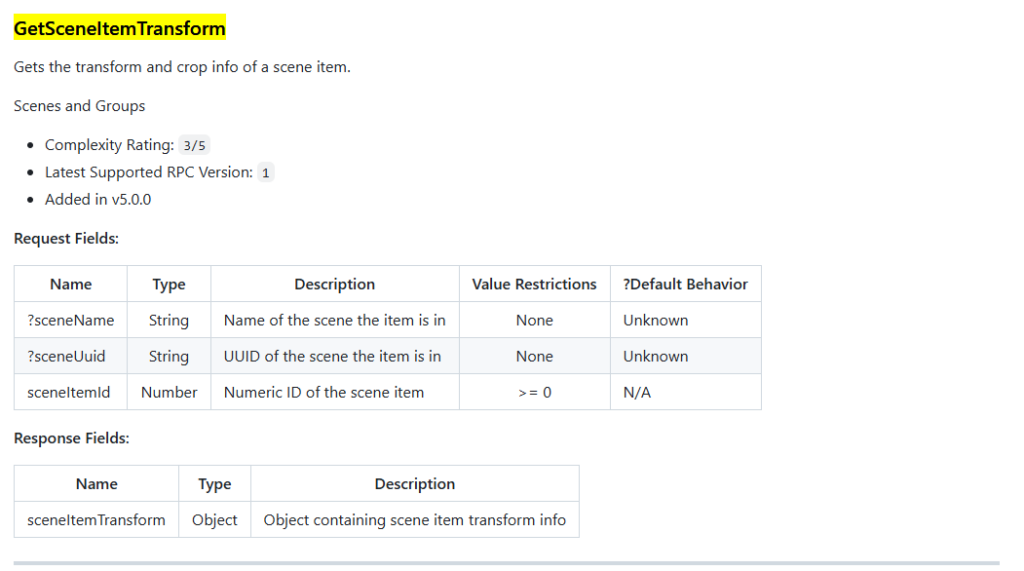
GetSceneItemTransformで返却されるResponse Fieldsでは以下が取得できます。
位置以外にも高さや幅やいろいろな設定ができるようです。
{'alignment': 5, 'boundsAlignment': 0, 'boundsHeight': 0.0, 'boundsType': 'OBS_BOUNDS_NONE', 'boundsWidth': 0.0, 'cropBottom': 0, 'cropLeft': 0, 'cropRight': 0, 'cropToBounds': False, 'cropTop': 0, 'height': 132.0, 'positionX': 100.0, 'positionY': 100.0, 'rotation': 0.0, 'scaleX': 0.5, 'scaleY': 0.5, 'sourceHeight': 264.0, 'sourceWidth': 1280.0, 'width': 640.0}

コメント